Version 3.1.7 · Free
Download the software
Free to use with the Easy Red 7 and Uston SS counts. Pick your platform and start counting in under a minute.
Windows
Windows 10/11 · 64-bit · 7.6 MB
1,430 downloads
When you run it, Windows may show “Windows protected your PC” with a “Don't run” button — that's SmartScreen's reputation check, not a virus flag (the file itself is signed and clean). Click “More info,” then “Run anyway.” This fades on its own as more people run this signed build.
macOS
macOS 10.14+ · Universal · 9.6 MB
1,669 downloads
Linux
Linux (x86_64) · AppImage · 16 MB
941 downloads
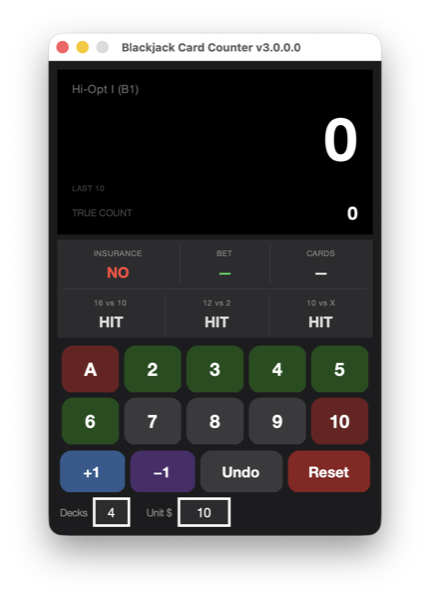
Up and running in three steps
01
Download & open
Grab the build for your OS and launch it. No installer bloat, no ads.
02
Pick a system
Start with Easy Red 7 or Uston SS — both free out of the box.
03
Count in real time
Tap cards as they're dealt and watch the running & true count update live.
Want all 21 preset strategies?
Register once to unlock every preset and add unlimited custom counts.
New to card counting? Read our beginner's guide to online blackjack.
Release Notes
v3.1.7
LatestSeptember 2, 2026- ◆macOS build is now notarized by Apple — fixes the "unidentified developer" Gatekeeper warning
- ◆No functional changes otherwise
v3.1.4
August 26, 2026- ◆Windows build is now Authenticode-signed — fixes Windows Defender flagging the download as a false-positive trojan
- ◆No functional changes otherwise
v3.1.3
July 15, 2026- ◆Bigger text throughout the app — main window, Basic Strategy chart, Instructions, and Strategies editor — for easier reading
- ◆Fixed a contrast bug in the Register window where the activation key was unreadable (light gray on white) on macOS
- ◆Added keyboard hotkeys: Up/+ for +1, Down/- for -1, Escape for Undo
v3.1.2
July 13, 2026- ◆Downloaded files are now named with the version number
- ◆Card keypad flashes when triggered by its keyboard shortcut, just like a click
- ◆Last 10 cards are now color-coded to match the keypad instead of plain text
- ◆Bigger, better-aligned text across the Insurance/Bet/Cards and deviation-hint rows
- ◆Added an app icon for macOS, Windows, and Linux
v3.1.1
July 13, 2026- ◆Fixed Decks and Unit $ fields locking up while typing a value
- ◆Decks/Unit $ now commit when you press Enter or click away, so multi-digit values no longer get cut off
v3.1
July 12, 2026- ◆Redesigned "Instrument" look — graphite body with an amber phosphor LCD display
- ◆Card keypad rebuilt as a circular phone-dialpad layout
- ◆Raised, glossy key styling instead of flat buttons
- ◆Complete rewrite — runs natively on macOS, Windows, and Linux
- ◆Color-coded card buttons (green=low, gray=neutral, red=high)
- ◆Keyboard shortcuts: 1=Ace, 2–9=cards, 0=Ten/face
- ◆Last 10 cards displayed on screen
- ◆True Count for all 14 balanced counting strategies
- ◆Color-coded basic strategy cheat sheet (Hard / Soft / Pairs tabs)
- ◆23 strategies included (21 unlocked with registration)
- ◆Redesigned instructions and strategy editor with inline validation
- ◆Updated for use on Windows 10!
- ◆Fixed bug that prevented the A/1 button from working.
v2.1
June 28, 201418,081 downloads (historical)- ◆Added True Count
- ◆Updated "Take Insurance" with more accurate method
- ◆Added Balanced and Unbalanced differentiator
- ◆Added card counting level for more accurate True Count
- ◆Changed keypad to reflect keyboard numpad
- ◆Added undo button
See the FAQ for installation help.